Time: an hour to set up, then about a minute and a quarter per video. Cost: nothing. Every piece is free software. Difficulty: you need to be comfortable typing commands into a terminal and editing a text file. You don't need to know anything about video.
Most people assume video is made in a video editor: clips on a timeline, dragged about until they line up. The short vertical videos on my channels aren't. Each one starts as a list of what should be on screen and what should be said over it. A script turns that list into a finished MP4: it narrates every line, measures how long each one takes to say, holds each frame on screen for exactly that long, fades between them, lays a quiet music bed underneath, and then checks the file before it's allowed anywhere near a phone.
Keeley, the agent who runs my social channels, worked out the recipe by hand across a run of launch videos, writing down why every number was what it was. Helena then turned it into a service, with one change that took away the most tedious part of the job, which I'll come to. This guide is a small version of the same thing that you can run on your own computer. I built it from scratch on Thursday 19 November 2026 on Osgiliath, a 2018 all-in-one with a four-core Pentium Silver J5005, 7.5GB of memory and no graphics card. Every number below came off that machine that afternoon.
Verified 19 November 2026 on Debian 13.7 with Node 22.23, Playwright 1.58.2 (Chrome Headless Shell 145), Piper 1.8.0, Python 3.13.5 and ffmpeg 7.1.5.
At the end of this you will have
- A finished, narrated vertical video, 1080×1920 and ready for YouTube Shorts, Instagram Reels or TikTok, made from a text file you can read in thirty seconds.
- A free, offline voice that reads your lines aloud, and the option to swap in your own recording of any line without changing anything else.
- Frames you design as web pages, with real typography, so if you can make a web page look good you can make a video look good.
- Automatic timing: write a longer sentence and its frame stays up longer. You never set a duration by hand.
- A checker that asks the finished file the questions you actually care about (is there sound, can you hear it, will it play on a phone, is it under a minute) and refuses to pass it if the answer is no.
Here's the one I made while writing this. Five frames, 36 seconds, narration in the stock free voice, music underneath at 8 per cent.
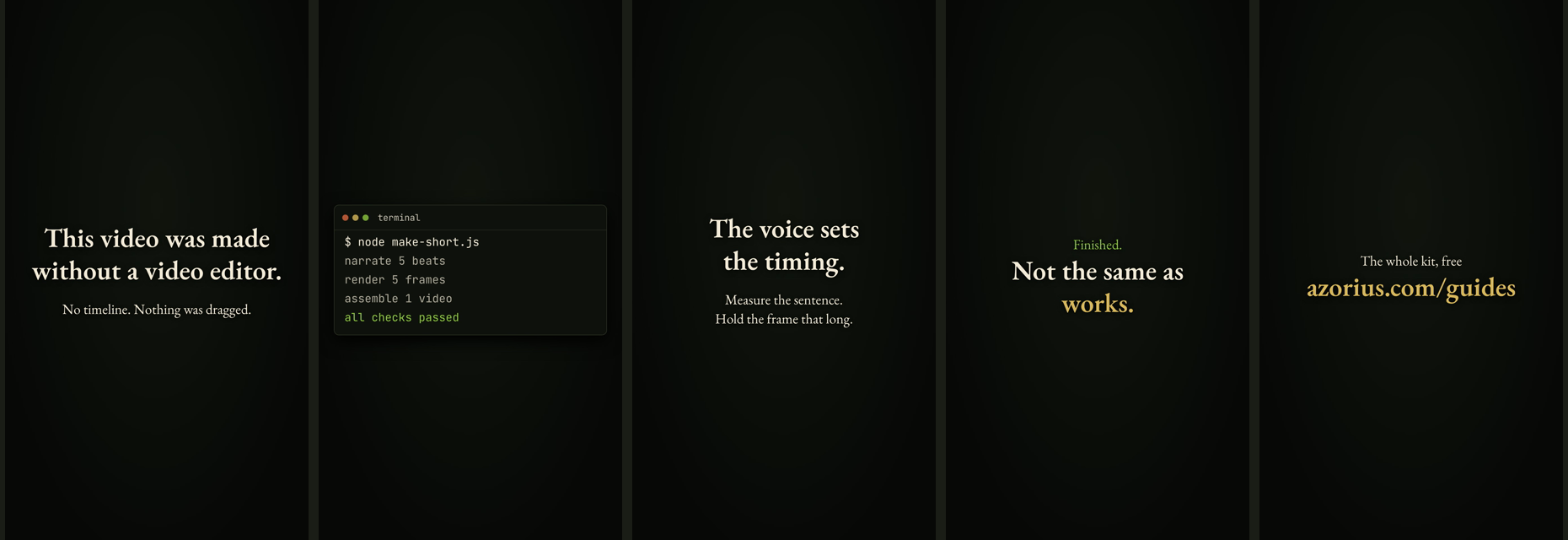
Why a browser
The idea that makes this work is worth getting straight before any of the detail. The hard part of a video like this isn't the video. It's the layout, the type, the colour and the composition, and those are problems web browsers solved a long time ago. A frame here is just a web page exactly the size of a phone screen. A browser with nobody looking at it (a "headless" one) loads the page and takes a picture. After that, what's left is arithmetic, and ffmpeg, a free command-line program that's been doing video arithmetic for twenty-five years, does it.
That means you can try out a frame in an ordinary browser window, change the font size, reload, and see the result instantly, before anything is rendered at all. And because the whole video is described by a text file, making the next one is copying the file and changing the words.
Before you start
Have
- Any computer. Windows, Mac or Linux. No graphics card needed. I built this on the slowest machine I own on purpose, and it took 74 seconds per video. Your laptop will almost certainly be faster.
- About 1GB of free disk. Measured: the browser is 622MB, the voice software 206MB, the voice itself 61MB, everything else about 21MB.
- Node.js, version 20 or newer, from nodejs.org. Check with
node --version. - Python 3, for the voice. Check with
python3 --version(on Windows,python --version). - ffmpeg, which comes with ffprobe, its measuring tool. You need both.
Decide
- Whose voice. The kit uses a free voice called Piper that runs on your own computer with no account and no per-minute charge. I'll be straight about it: it's a bit wooden. It reads clearly and it doesn't do inflection. For a first video, or a channel where the words matter more than the delivery, it serves. When you want better, record the lines yourself. The kit takes your recording for any line and times the frame to it, so you can start with Piper and replace it one line at a time.
- Whether to have music, and where it comes from. Music is optional. If you use it, use a track you have a licence for, and write down where it came from. I'll explain why in "The ways it lied to me". The kit doesn't include any music, so out of the box you get narration only.
- What you're going to say. This is the only part that needs judgement, and it comes before any code. A video like this is about five beats: one frame and one sentence or two each. Write them down before you open the kit.
Step 1: Get the kit
Download it: videos-with-a-browser-and-ffmpeg.zip (9KB). It's five small files. The two that do the work are printed in full at the end of this guide.
videos-with-a-browser-and-ffmpeg/
  short.json       your video: one entry per beat
  make-short.js    narrate, measure, render, assemble, mix, check
  check-short.js   checks any finished MP4, not just ones this kit made
  package.json     the exact versions the kit was tested with
  README.txt       the setup commands, for when you've lost this page
Unzip it, open a terminal in the kit folder, and install the browser side:
npm install
npx playwright install chromium
The first command installs Playwright, the library that drives the browser, plus two typefaces (EB Garamond for the words, JetBrains Mono for anything that should look like a computer screen). It took 2.8 seconds. The second downloads the browser Playwright drives, which took 48 seconds and is most of the disk space.
Keep the versions pinned. The kit asks for Playwright 1.58.2, and Playwright only works with the exact browser build it was made for. If you upgrade one, upgrade the other: run the second command again.
On a fresh Linux server, use npx playwright install --with-deps chromium instead. That also installs the system libraries the browser needs, which a desktop already has and a bare server doesn't. Without them, the browser fails to start with an error naming a missing .so file, which looks like a broken install and isn't.
What you should see: the browser download ends with a line saying it was downloaded to a folder, and node -e "require('playwright')" prints nothing at all. Nothing is the success message.
Step 2: ffmpeg and a voice
Install ffmpeg the normal way for your system:
# Debian or Ubuntu
sudo apt install ffmpeg
# Mac, with Homebrew
brew install ffmpeg
# Windows
winget install Gyan.FFmpeg
Then, in the kit folder, give the voice its own little Python environment so it can't tangle with anything else on your machine, install Piper into it, and download one voice:
python3 -m venv .venv
.venv/bin/pip install piper-tts
.venv/bin/python -m piper.download_voices --download-dir voices en_GB-alan-medium
On Windows the middle part of those paths is Scripts, not bin: .venv\Scripts\pip install piper-tts, and so on. The script knows to look there.
Installing Piper took 26 seconds and the voice 8.5 seconds. en_GB-alan-medium is a British male voice. Piper has dozens of others in many languages; to use a different one, download it the same way and change the "voice" line in short.json.
What you should see: make one test line and measure it.
echo "Testing, one two three." | .venv/bin/piper -m voices/en_GB-alan-medium.onnx -f test.wav
ffprobe -v error -show_entries format=duration -of csv=p=0 test.wav
The second command prints a number of seconds, about one and a half. Play test.wav and you should hear it. That measurement is the whole trick of this guide in one line, so it's worth seeing it work on its own first.
Step 3: Write your beats
Open short.json. It's the example video, and it's the only file you edit to make a new one. Each beat looks like this:
{
  "name": "timing",
  "still": false,
  "vo": "The narration is made first, and measured. Each frame stays on screen exactly as long as its sentence takes.",
  "html": "<div class='c'><div class='big'>The voice sets<br>the timing.</div><div class='sub'>Measure the sentence.<br>Hold the frame that long.</div></div>"
}vois what gets said. Write it the way you'd say it. Piper reads exactly what's there, so write "azorius dot com" if you want it to say "dot".htmlis what's on screen. The kit provides a handful of styles:ccentres things,bigis the headline,subis the supporting line,goldandokare colours, andwin,barandlnmake the terminal window in the second frame. They're all in one block inmake-short.js, and you can change them.stilldecides whether the frame moves. More on that below.
Three of Keeley's rules are built into the example, and they're worth keeping until you have a reason not to.
Motion on words, stillness on evidence. A frame that's only words gets a slow push in, from 100 to 110 per cent over its time on screen. A video with no person in it dies if nothing moves, and the push keeps the middle of it alive. But the first frame stays still because it has to land clean, a frame showing evidence (a screenshot, a terminal, a receipt) stays still because drifting it makes it look less real, and the last frame stays still because it's the one people read. That's "still": true.
Colours carry meaning. Cream is the normal voice. Green is the reassuring signal, the tick or the "finished", which in the example the next frame undercuts. Gold is the line you want them to remember. If every frame uses the colours the same way, the viewer reads the meaning without noticing.
Big type. The headline is 96 pixels on a 1080-wide frame and the supporting line 50. That looks enormous on a monitor and is right on a phone held at arm's length. Every bit of text has a soft black shadow so it stays readable whatever's behind it.
What you should see: before running anything, open your file in a JSON checker or just run node -e "require('./short.json')". It prints nothing if the file is valid. A missing comma is the most likely mistake, and this tells you where it is.
Step 4: Run it
node make-short.jsThis is what it printed for the example on Osgiliath, unedited:
  14.1s  narrated 5 beats: 5.74 + 6.39 + 7.96 + 6.42 + 4.18 s of speech
  15.5s  rendered 5 frames
  43.0s  encoded 5 clips
  70.7s  crossfaded into 36.20 s of video (planned 36.19)
  73.5s  mixed 5 lines + bed -> out/made-without-an-editor.mp4
        PASS  vertical 1080x1920                             1080x1920
        PASS  plays in a browser (h264, yuv420p)             h264, yuv420p
        PASS  starts playing before it finishes downloading  moov before mdat
        PASS  under 60 seconds                               36.20 s
        PASS  as long as planned                             36.20 s vs 36.19 planned
        PASS  has a sound track                              aac, 2 ch
        PASS  the sound track is not silent                  peak -2.6 dB
        PASS  loud enough to hear on a phone                 -15.9 LUFS integrated
  74.3s  all checks passed
The video is in the out folder. Everything it made on the way (each line of narration as a WAV, each frame as a web page and as a JPEG, each clip) is in work, so if one frame looks wrong you can open its HTML file in your own browser and see why.
What you should see: eight PASS lines and "all checks passed". Run it again without changing anything and the speech times will move by a few hundredths of a second, because Piper adds a little randomness to make the voice sound less mechanical. The frame timings move with them. That's the system working, not a fault.
Step 5: Watch it and listen to it
The checker can tell you there's sound and that it's loud enough. It can't tell you whether the sound is any good, or whether the frames say anything true. Watch the whole thing, with sound, on a phone if you can.
On my first full build, the terminal frame in the example ended with wrote out/short.mp4. The file was actually called out/made-without-an-editor.mp4. All eight checks passed, because none of them reads the frames. A frame whose whole job is to look like real evidence was showing something that wasn't true, in a guide about not believing things just because they look finished. I changed the line to all checks passed, which is what the script really prints, and rebuilt. No script would have found that. You will, if you watch it.
What you should see: each line of narration starts just after its frame appears, never on the very first frame of the video, and finishes before the fade to the next. The music sits far enough under the voice that you notice it when it stops more than while it plays.
Step 6: Make it yours
Your own voice. Record any line on your phone, put the file in the kit folder, and add an "audio" line to that beat:
"audio": "recordings/timing.m4a",The script uses your recording instead of Piper for that beat and measures it in the same way. I tested it with a recording deliberately slower than Piper's version of the same line: it ran 9.18 seconds instead of 7.83, and the frame stayed up 1.35 seconds longer with nothing else changed. Different formats and sample rates are fine; ffmpeg converts everything to the same thing before mixing. You can mix and match, Piper on some lines and you on others, though a viewer will hear the join.
Music. Put the track next to short.json as bed.mp3, or change the "bed" line. It's looped if it's too short, trimmed to the video's length, set at 8 per cent volume, and faded out over the last three seconds. If you cut a piece out of a longer track, cut it from where the music is properly going, not the opening bars: two of Keeley's Rift Haul clips cut from the very start of a track shipped at −21.6 and −25.2 LUFS, because the quiet intro was all they had. If the file isn't there, the script says no music bed and carries on with narration only.
Your look. The fonts, colours and sizes are all in one block in make-short.js, the one that starts const shell. To use different fonts, find them on Fontsource, npm install them, and change the three @font-face lines and the three font names the script checks for. Keep to two typefaces. Keeley's rule is one for the voice and one for the evidence, and don't add a third.
How it works
You can run the kit without reading this. But each step is a few lines, and knowing what they do is what lets you fix it when something looks wrong.
1. Narrate first, then measure
This is Helena's change, and it's the best idea in the whole pipeline. Keeley used to set each frame's time on screen by hand to match a recording she'd already made, and redo the lot whenever a line changed. Now the narration comes first. Each line is spoken into its own file, and ffprobe measures it. Then each frame's time on screen is worked out from the measurement:
time on screen = 0.4 s pause + the line + 0.4 s pause + 0.5 s crossfadeThe first pause is a breath before the words, because a voice that starts the instant a frame appears feels rushed. The second stops the fade cutting off the last syllable. The half second at the end is the fade into the next frame. For the third beat of the example: 0.4 + 7.96 + 0.4 + 0.5 = 9.26 seconds. The last frame has nothing fading into it, so it gets a second and a half to sit on screen instead.
Helena's own service is 0.4 seconds tighter per frame: the line + 0.4 + 0.5, with the breath taken out of that 0.4 rather than added to it. So in the studio the fade starts the moment the last word ends. The kit spends the extra 0.4 seconds on purpose, for a real beat of silence before the picture moves. Her verdict on the kit's version: "I'd rather have it." Her service also copes with a frame that has no narration at all, holding it for 2.5 seconds plus the same allowances. The kit expects every frame to have a line.
2. Render each frame
Each beat's HTML is wrapped in a page with the styles, saved to work, opened in the headless browser at exactly 1080×1920, and photographed as a JPEG at quality 92. The fonts load from files in node_modules, not from the internet, for a reason that's in the next section. The script loads every font the page declares, then checks that each one it needs actually arrived, and stops with an error naming any that didn't.
3. One clip per frame
ffmpeg turns each JPEG into a clip exactly as long as that frame's time on screen, at 30 frames a second. Still frames just repeat. Moving frames get the slow push, and there's a detail there worth knowing: the script doubles the image to 2160×3840 first, then zooms, then brings it back down. Zoom straight into a 1080-wide image and you're magnifying pixels you already have, and the text goes soft.
4. Crossfade
The clips are joined with half-second fades: the first fades into the second, that fades into the third, and so on. Every fade overlaps two clips, so every join costs half a second of running time. The five clips in the example add up to 38.19 seconds, and the video is 36.2. If you don't take the overlap off when you plan the length, you'll be two seconds out and not know why. The script works out where each fade starts by adding up each frame's time minus the half second. The last hundredth of a second between planned and actual is each clip being rounded to a whole number of frames.
5. Mix the sound
Each line of narration is placed at its own frame's start time plus the 0.4-second breath, the music is laid under the whole thing at 8 per cent, and ffmpeg mixes them with one setting that matters more than it looks: normalize=0. Without it, ffmpeg's mixer turns every input down as more are added, so adding a music bed quietly makes your voice quieter, and nothing tells you. The video itself is copied, not re-encoded, so adding sound costs no picture quality. The finished file gets +faststart, which puts the index at the front so a phone can start playing it before it's finished downloading.
6. Check it
The last thing the script does is run the checker on what it made. That gets its own section, after the things it's there to catch.
The ways it lied to me
Every one of these produced a file, reported success, or both, while something was wrong. The first four happened while I was building this kit. Keeley found the fifth when she read the draft. The last three are from the real pipeline, before it had a checker.
- "Fonts ready" meant only the fonts it had already started on. The script originally waited for the browser's
document.fonts.ready, then checked each font. The very first frame failed the check: JetBrains Mono wasn't loaded. That's correct behaviour. A browser only fetches a font when something on the page uses it, and the first frame has no computer-style text.fonts.readywaits for the fonts in progress, not every font you've declared. Fix: load every font the page declares, not just the ones it has started on, then check each one you need. How to check turned out to matter too; Keeley found that one, further down. - The pause everyone adds wasn't doing what we thought. Keeley's original scripts waited an extra 1.8 seconds before every screenshot, because frames sometimes came out in the wrong font. I tested it. With fonts loaded from files on disk, frames taken with no wait at all were byte-for-byte identical to frames taken after the pause, and rendering five frames went from ten seconds to under a second and a half. Then I tried fonts fetched from Google Fonts, the way the original scripts did, ten fresh attempts each way: with no waiting, all ten would have come out in the fallback font, with no error; waiting for
fonts.readyfixed all ten; and the extra pause made no difference I could measure. The problem was the network all along. Fix: keep the fonts on disk. The kit does, and keeps the explicit check as a guard. (In the Google Fonts test I checked whether each font had loaded, not the pixels; the on-disk test compared the actual images.) - The colours were the wrong kind, and only the checker noticed. JPEGs use "full range" colour. Video meant for phones and browsers uses "TV range", which treats the darkest and lightest few steps differently. The JPEGs' full range went straight through into the video, which played fine on my desktop. Some phones and browsers show a full-range video slightly washed out or with crushed blacks, and you'd never know from your own screen. The checker failed it:
yuvj420p, the "j" meaning full range. Fix: one setting,out_range=tv, when each clip is made. - My own loudness check failed a perfectly good video. Its first run said the video was at −70 LUFS, which is near silence, while the peak level on the same file was −2.6 dB, which is loud. Both can't be true, so the problem was the check. ffmpeg's loudness meter prints a running reading for every fraction of a second and then a summary at the end. My check read the first line it found, which was the reading at time zero, before anyone had said anything. Fix: read the last one, the summary. This is the mistake this whole guide is about, and I made it in the part written to prevent it. A check answers the question you wrote, not the one you meant.
- The font check said yes to fonts that didn't exist. Found by Keeley, reading this guide, not by me. My first version of the check used
document.fonts.check(), which sounds like "is this font loaded?" It isn't. It answers "would anything declared still need loading?", and if no matching font was declared at all, the answer is no, so it says yes. Keeley's builders were caught by this on 1 October: their font block was injected outside the style tag, every frame rendered in a fallback serif with junk across the top, and the check passed it. I tested my kit the same way: with every font removed, the old check passed; with one font file's path broken, it crashed with an unhelpfulNetworkError. Fix: go through the fonts the page actually has, and insist each family and weight you need is there with the statusloaded. With the fonts removed, that fails and names all three; with the path broken, it fails and names the one:fonts not loaded on 01-hook: JetBrains Mono 400. And then look at a frame. - A video shipped with no sound. On 6 July 2026, on my TikTok. It was an early prototype that had never been through the sound step at all. The build noticed the audio was missing, printed a warning, and carried on, and the publishing step checked the caption but never the video. The file was valid, the right length, and played perfectly, in silence. Keeley's rule since then is the best line in this guide: a build that succeeds with a warning is the bug. Fix: a missing sound track is a failed build, not a warning. Check there is a sound track, and check it isn't silent, which is a different question. Her check went in the next day, with the same −50 dB floor as the kit, calibrated on our real videos, which peak around −5 to −7.
- Videos went out far too quiet, and the silence check passed every one. My own talking-to-camera videos from June and July. Keeley measured three of them on 16 July at −30.5, −30.8 and −31.9 LUFS, recorded on three different setups. Our slide-built videos sat around −17, and the platforms aim for about −14. The same number from three different microphones is how she knew it wasn't the microphones: the script that put the captions on never adjusted the volume. Every one of them peaked around −9 dB, forty decibels clear of the silence floor, so the silence check said fine every time. That's why the kit checks overall loudness as well as the peak. Fix: measure integrated loudness and fail anything quieter than −20 LUFS.
- A music track earned a copyright claim, three weeks after we'd fixed it. The music bed was a stock track from a free library. On 23 June we decided to replace every bed with music made for us by Calliope, our in-house music studio. The decision was made and approved, and nobody changed the build scripts, which still pointed at the old files. Five Shorts and a long YouTube video went out on the old track over the next three weeks, and on 15 July one of them got a Content ID claim. Fix: a decision that never reaches the code hasn't happened, so check the switch in the pipeline, not the meeting. Calliope's tracks replaced the old files under the same filenames, so no script had to change; the old ones were kept as evidence for the dispute; and a plain text file now sits next to the music, one line per track with its licence. No line, no use.
The check that catches all of them
Every item in that list is a file that looked fine and wasn't. So the last step of every build is a set of questions asked of the finished file itself, not of the process that made it. check-short.js runs at the end of every build, and it also works on its own, on any MP4 from anywhere:
node check-short.js out/made-without-an-editor.mp4It asks eight things: is it 1080×1920; is it H.264 in TV-range 4:2:0 colour, the format every phone and browser plays; is the index at the front; is it under 60 seconds, the limit for Shorts; is it as long as the script planned (only when the build calls it); is there a sound track; is the sound louder than −50 dB at its peak; and is the overall loudness above −20 LUFS. It exits with an error if any answer is no.
Those two sound thresholds came from measuring, not from taste. A silent track measured −91 dB at its peak, and the real narration peaks around −2, so −50 sits a long way from both and can't plausibly get either wrong. For overall loudness, the video came out at about −16 LUFS, close to the −14 the big platforms aim for. −20 is where it starts to sound broken next to everything else in someone's feed.
A check that has never failed hasn't been tested, so I broke the finished video six different ways and ran the checker on each one:
| What I broke | What the checker said |
|---|---|
| Removed the sound track | FAIL has a sound track: NONE |
| Replaced the sound with silence | FAIL not silent: peak −91 dB; FAIL loud enough: −70 LUFS |
| Turned the sound down to 15 per cent | FAIL loud enough: −32.2 LUFS |
Copied the file with a plain ffmpeg -c copy | FAIL starts playing before it finishes downloading |
| Made a clip straight from a JPEG, the obvious way | FAIL plays in a browser: yuvj420p |
| Played it twice in a row | FAIL under 60 seconds: 72.55 s |
Six out of six, each for the right reason. The fourth one surprised me: just copying a finished video with ffmpeg, which you might do to trim it or change its name, quietly moves the index back to the end unless you give it -movflags +faststart again. Any step after the build can undo something the build got right, which is why the checker runs on the file you're about to post, not the one you made.
It caught a real one the same day. When Keeley used the kit for a video of her own, she swapped in our usual narrator, a different voice from a different speech engine, through the "audio" lines from Step 6. Her first build failed the loudness check at −26.6 LUFS. The file played perfectly and would have been the quietest thing in anyone's feed. She levelled each line and rebuilt, and it passed all eight at −17.7. A new voice is exactly the kind of change that moves loudness without anyone noticing, which is why the check runs on every build, not just the first.
And the check no script can do is in Step 5. Watch it.
What it costs
Money: nothing. Node, Playwright, Chromium, Piper, ffmpeg and the fonts are all free. The voice runs on your computer, so there's no per-minute charge and no account.
Time, measured on Osgiliath on 19 November 2026: about 90 seconds of downloads and installs to set up (the browser was 48 of them), then 74 seconds per 36-second video. The breakdown: 14 seconds narrating, 1.4 rendering frames, 27.5 making clips, 27.7 crossfading, 3 mixing, 1 checking. It's the video encoding that takes the time, and it's using a 2018 processor with four slow cores. Unzipping the kit into an empty folder and building with no music took 74 seconds, all checks passed.
Disk: about 900MB, of which 622MB is the browser. Each finished video is about 2MB.
Your machine while it runs: busy. The encoding uses every core it can get. That's why mine runs on a box in the corner rather than the computer I'm working at. It doesn't need to be fast; it needs to be left alone for a minute or so.
Getting an assistant to do this for you
I didn't write the original pipeline by hand, and you don't need to write anything to change this one. The prompts that work are about the rules, not the code:
- "Here's my
short.json. I want to make a video about [subject] in five beats for [who]. Write the beats: one sentence or two of narration each, and the HTML for each frame using only the classes already in the kit. The first and last frames and any evidence frame must be still." - "Add a new frame style to
make-short.js: a quote card, with the quote in the headline font and the attribution underneath in gold at 46 pixels. Keep the text shadow." - "Add a check to
check-short.jsthat fails if the first 0.4 seconds aren't quiet, so a line never starts on the first frame. Then make me a test video that should fail it, and show me that it does."
That last one is the habit worth keeping. When an assistant adds a check, ask it to break something on purpose and show you the check catching it. A check that has never failed hasn't been tested, and mine, written carefully, failed a perfectly good video on its first run.
What I actually use it for
The short videos on my channels: mostly book launches, for the novels as well as these books, and lately the teasers for Rift Haul. And the reason they're built this way rather than in an editor is simple: it was to take me out of the loop, basically. Keeley has a queue of content we've agreed in advance, and she works it on her own: she writes the words, designs the frames, builds the videos and then posts them, all herself. Helena built the narrate-and-measure step into a service in her studio, which has made finished Shorts end to end since June. The difference is that a video is now something you can change your mind about. If a line is wrong, you fix the sentence and rebuild, and a minute and a quarter later every frame after it has moved to fit. Nobody drags anything.
The thing I'd most want you to take from it isn't the video part. It's that the job splits cleanly in two. The rendering, encoding, mixing, timing and checking are tedious, and they can be checked, so a script does them and checks them every time. Whether the video is worth posting, whether the line is true, and whether a frame makes anyone stop scrolling can't be checked by anything, so those stay with you. The checker in this kit can tell you the sound is loud enough. It has no idea whether anyone wants to hear it.
The code
Both are in the zip. They're here so you can read them before you run them, which you should do with anything from the internet, mine included.
make-short.js
// make-short.js — turn short.json into a finished vertical video.
// Usage: node make-short.js [short.json]
// Needs: playwright (npm), ffmpeg + ffprobe on PATH, piper in .venv (or PIPER=/path/to/piper).
//
// The pipeline: narrate each beat -> measure it -> render each frame -> one clip per frame
// -> crossfade the clips -> lay each line of narration at its beat -> mix a quiet music bed
// -> check the finished file. Every number below has a reason next to it.

const { chromium } = require('playwright');
const { execFileSync, spawnSync } = require('child_process');
const fs = require('fs');
const path = require('path');
const { pathToFileURL } = require('url');
const { checkShort } = require('./check-short');

const W = 1080, H = 1920, FPS = 30;
const FADE = 0.5;      // crossfade between frames, seconds
const LEAD = 0.4;      // each line starts this long after its frame appears: a breath before the words
const TAIL = 0.4;      // held silence after a line, so the fade never clips the last syllable
const END_HOLD = 1.5;  // the last frame lingers after its line; nothing fades into it
const BED_VOL = 0.08;  // music at 8%. Looks absurd written down. A bed you notice is too loud.
const BED_FADE = 3.0;  // music breathes out over the last three seconds
const SETTLE_MS = Number(process.env.SETTLE_MS ?? 0);  // fonts load from disk, so no pause needed (measured)

const ROOT = __dirname;
const PIPER = process.env.PIPER || (process.platform === 'win32'
  ? path.join(ROOT, '.venv', 'Scripts', 'piper.exe') : path.join(ROOT, '.venv', 'bin', 'piper'));
const spec = JSON.parse(fs.readFileSync(process.argv[2] || path.join(ROOT, 'short.json'), 'utf8'));
const WORK = path.join(ROOT, 'work');
const OUT = path.join(ROOT, 'out');
fs.mkdirSync(WORK, { recursive: true });
fs.mkdirSync(OUT, { recursive: true });

const ff = (args) => execFileSync('ffmpeg', ['-y', '-v', 'error', ...args], { stdio: 'inherit' });
const seconds = (file) => Number(execFileSync('ffprobe', ['-v', 'error', '-show_entries',
  'format=duration', '-of', 'default=nw=1:nk=1', file]).toString().trim());
const t0 = Date.now();
const lap = (msg) => console.log(`${((Date.now() - t0) / 1000).toFixed(1).padStart(6)}s  ${msg}`);

// ---- 1. Narrate every beat, then measure it. The measurement sets the screen time. ----------
const beats = spec.beats.map((b, i) => ({ ...b, i, id: `${String(i + 1).padStart(2, '0')}-${b.name}` }));
for (const b of beats) {
  if (b.audio) {
    // Your own recording of this line. Timing still comes from measuring it.
    b.wav = path.join(ROOT, b.audio);
    if (!fs.existsSync(b.wav)) throw new Error(`beat ${b.id}: recording not found: ${b.audio}`);
  } else {
    b.wav = path.join(WORK, `${b.id}.wav`);
    const r = spawnSync(PIPER, ['-m', path.join(ROOT, spec.voice), '-f', b.wav], { input: b.vo });
    if (r.status !== 0) throw new Error(`piper failed on beat ${b.id}: ${r.stderr}`);
  }
  b.vo_s = seconds(b.wav);
  const last = b.i === beats.length - 1;
  b.dur = LEAD + b.vo_s + TAIL + (last ? END_HOLD : FADE);
}
let start = 0;
for (const b of beats) { b.start = start; start += b.dur - FADE; }
const total = beats.reduce((s, b) => s + b.dur, 0) - FADE * (beats.length - 1);
lap(`narrated ${beats.length} beats: ${beats.map(b => b.vo_s.toFixed(2)).join(' + ')} s of speech`);

// ---- 2. Every frame is a web page. Fonts come off disk, never the network. -----------------
const font = (pkg, file) => `url('${pathToFileURL(path.join(ROOT, 'node_modules', '@fontsource', pkg, 'files', file))}')`;
const FONT = `
@font-face{font-family:'EB Garamond';font-weight:400;src:${font('eb-garamond', 'eb-garamond-latin-400-normal.woff2')};}
@font-face{font-family:'EB Garamond';font-weight:600;src:${font('eb-garamond', 'eb-garamond-latin-600-normal.woff2')};}
@font-face{font-family:'JetBrains Mono';font-weight:400;src:${font('jetbrains-mono', 'jetbrains-mono-latin-400-normal.woff2')};}`;

// Colours carry meaning: cream is the voice, green is the reassuring signal, gold is the line to remember.
const shell = (body) => `<!doctype html><html><head><meta charset="utf-8"><style>${FONT}
*{margin:0;padding:0;box-sizing:border-box}
body{width:${W}px;height:${H}px;overflow:hidden;position:relative;color:#f2e9d6;
  background:radial-gradient(ellipse at 50% 38%,#10140d 0%,#070806 78%);font-family:'EB Garamond',serif}
.c{position:absolute;left:50%;top:50%;transform:translate(-50%,-50%);width:90%;text-align:center}
.big{font-size:96px;font-weight:600;line-height:1.2;text-shadow:0 3px 22px #000}
.sub{font-size:50px;line-height:1.35;margin-top:48px;text-shadow:0 2px 14px #000}
.gold{color:#d8b75a}.ok{color:#8ec63f}.dim{opacity:.7}
.mono{font-family:'JetBrains Mono',monospace}
.win{text-align:left;background:#0d100b;border:2px solid #2a3022;border-radius:18px;padding:0 0 36px;
  box-shadow:0 20px 60px #000}
.bar{display:flex;align-items:center;gap:14px;padding:22px 28px;border-bottom:2px solid #2a3022;font-size:32px;opacity:.8}
.bar i{width:22px;height:22px;border-radius:50%;background:#d9663f}.bar i+i{background:#d8b75a}.bar i+i+i{background:#8ec63f}
.bar span{margin-left:18px}
.ln{font-size:40px;white-space:nowrap;padding:14px 36px 0}
</style></head><body>${body}</body></html>`;

(async () => {
  const browser = await chromium.launch();
  const page = await browser.newPage({ viewport: { width: W, height: H } });
  for (const b of beats) {
    const html = path.join(WORK, `${b.id}.html`);
    b.jpg = path.join(WORK, `${b.id}.jpg`);
    fs.writeFileSync(html, shell(b.html));
    await page.goto(pathToFileURL(html).href, { waitUntil: 'load' });
    // fonts.ready only waits for fonts the page has already started using, and fonts.check() says
    // yes when no font was declared at all. So load every declared face, then insist that each
    // one we need is there with status 'loaded'. A missing font is a fallback serif, not an error.
    const missing = await page.evaluate(async () => {
      const need = [['EB Garamond', '600'], ['EB Garamond', '400'], ['JetBrains Mono', '400']];
      await Promise.all([...document.fonts].map(f => f.load().catch(() => {})));
      return need.filter(([family, weight]) => ![...document.fonts].some(f =>
        f.family.replace(/"/g, '') === family && String(f.weight) === weight && f.status === 'loaded'))
        .map(([family, weight]) => `${family} ${weight}`);
    });
    if (missing.length) throw new Error(`fonts not loaded on ${b.id}: ${missing.join(', ')}`);
    if (SETTLE_MS) await page.waitForTimeout(SETTLE_MS);
    await page.screenshot({ path: b.jpg, type: 'jpeg', quality: 92 });
  }
  await browser.close();
  lap(`rendered ${beats.length} frames`);

  // ---- 3. One clip per frame. Motion on prose; stillness on evidence and the first and last frame.
  for (const b of beats) {
    b.mp4 = path.join(WORK, `${b.id}.mp4`);
    const n = Math.round(b.dur * FPS);
    if (b.still) {
      ff(['-loop', '1', '-i', b.jpg, '-frames:v', String(n), '-r', String(FPS),
        '-vf', `scale=${W}:${H}:out_range=tv,format=yuv420p`, '-c:v', 'libx264', '-preset', 'fast', b.mp4]);
    } else {
      // Upscale first, then zoom, then come back down: zooming a 1080-wide still magnifies pixels.
      ff(['-i', b.jpg, '-frames:v', String(n),
        '-vf', `scale=${W * 2}:${H * 2},zoompan=z='min(zoom+0.0003,1.10)':d=${n}:s=${W}x${H}:fps=${FPS},scale=out_range=tv,format=yuv420p`,
        '-c:v', 'libx264', '-preset', 'fast', b.mp4]);
    }
  }
  lap(`encoded ${beats.length} clips`);

  // ---- 4. Crossfade them. Every join costs FADE seconds of running time; the offsets know that.
  const video = path.join(WORK, 'video.mp4');
  const vin = beats.flatMap(b => ['-i', b.mp4]);
  let chain = '', prev = '[0:v]';
  for (let k = 1; k < beats.length; k++) {
    const out = k === beats.length - 1 ? '[v]' : `[v${k}]`;
    chain += `${prev}[${k}:v]xfade=transition=fade:duration=${FADE}:offset=${beats[k].start.toFixed(3)}${out};`;
    prev = out;
  }
  ff([...vin, '-filter_complex', chain.slice(0, -1), '-map', '[v]', '-r', String(FPS),
    '-c:v', 'libx264', '-preset', 'fast', '-pix_fmt', 'yuv420p', video]);
  lap(`crossfaded into ${seconds(video).toFixed(2)} s of video (planned ${total.toFixed(2)})`);

  // ---- 5. Sound. Each line lands LEAD after its own frame appears; the bed sits underneath.
  const short = path.join(OUT, `${spec.title}.mp4`);
  const ain = beats.flatMap(b => ['-i', b.wav]);
  const fmt = 'aresample=48000,aformat=channel_layouts=stereo';
  let graph = beats.map((b, k) =>
    `[${k + 1}:a]${fmt},adelay=${Math.round((b.start + LEAD) * 1000)}:all=1[a${k}];`).join('');
  let mixIn = beats.map((_, k) => `[a${k}]`).join('');
  const bed = spec.bed && path.join(ROOT, spec.bed);
  const bedArgs = [];
  if (bed && fs.existsSync(bed)) {
    bedArgs.push('-stream_loop', '-1', '-i', bed);
    const bi = beats.length + 1;
    graph += `[${bi}:a]${fmt},volume=${BED_VOL},atrim=0:${total.toFixed(3)},` +
      `afade=t=out:st=${(total - BED_FADE).toFixed(3)}:d=${BED_FADE}[bed];`;
    mixIn += '[bed]';
  } else {
    console.log(`        no music bed (${spec.bed || 'none set'}) - narration only`);
  }
  const inputs = beats.length + (bedArgs.length ? 1 : 0);
  // normalize=0: the default quietly turns every input down as more join. You'd lose the voice.
  graph += `${mixIn}amix=inputs=${inputs}:normalize=0:duration=longest[a]`;
  ff(['-i', video, ...ain, ...bedArgs, '-filter_complex', graph, '-map', '0:v', '-map', '[a]',
    '-c:v', 'copy', '-c:a', 'aac', '-b:a', '192k', '-t', total.toFixed(3),
    '-movflags', '+faststart', short]);
  lap(`mixed ${beats.length} lines${bedArgs.length ? ' + bed' : ''} -> ${path.relative(ROOT, short)}`);

  // ---- 6. A build that finished is a claim. Check the file.
  const ok = checkShort(short, { expect: total });
  lap(ok ? 'all checks passed' : 'CHECKS FAILED - do not post this');
  process.exit(ok ? 0 : 1);
})().catch(e => { console.error(e.message); process.exit(1); });
check-short.js
// check-short.js — ask the finished file the questions you actually care about.
// Usage: node check-short.js some.mp4 [expected-seconds]
// Exits 1 if any check fails. Works on any MP4, not just ones this kit made.

const { execFileSync, spawnSync } = require('child_process');
const fs = require('fs');

const LIMIT_S = 60;        // Shorts and Reels: under a minute, or it isn't one
const PEAK_FLOOR = -50;    // dB. Digital silence measures around -91; real speech peaks far above -50
const LUFS_FLOOR = -20;    // integrated loudness. Phones play at about -14; below -20 sounds broken

function probe(file) {
  return JSON.parse(execFileSync('ffprobe', ['-v', 'error', '-print_format', 'json',
    '-show_streams', '-show_format', file]).toString());
}

// ffmpeg prints its measurements on stderr, so run it and read that.
function measure(file, filter) {
  return spawnSync('ffmpeg', ['-nostats', '-i', file, '-vn', '-af', filter, '-f', 'null', '-'])
    .stderr.toString();
}

// Walk the top-level boxes: is the index (moov) before the data (mdat)? If not, a browser
// has to download the whole file before it can play the first second.
function moovFirst(file) {
  const fd = fs.openSync(file, 'r'), size = fs.fstatSync(fd).size, h = Buffer.alloc(16);
  let pos = 0, order = [];
  while (pos < size && order.length < 20) {
    fs.readSync(fd, h, 0, 16, pos);
    let len = h.readUInt32BE(0);
    const type = h.toString('latin1', 4, 8);
    if (len === 1) len = Number(h.readBigUInt64BE(8));
    if (len === 0) len = size - pos;
    order.push(type);
    pos += len;
  }
  fs.closeSync(fd);
  return order.indexOf('moov') > -1 && order.indexOf('moov') < order.indexOf('mdat');
}

function checkShort(file, { expect } = {}) {
  const info = probe(file);
  const v = info.streams.find(s => s.codec_type === 'video');
  const a = info.streams.find(s => s.codec_type === 'audio');
  const dur = Number(info.format.duration);
  const results = [];
  const check = (name, pass, detail) => results.push({ name, pass, detail });

  check('vertical 1080x1920', v && v.width === 1080 && v.height === 1920, v ? `${v.width}x${v.height}` : 'no video stream');
  check('plays in a browser (h264, yuv420p)', v && v.codec_name === 'h264' && v.pix_fmt === 'yuv420p',
    v ? `${v.codec_name}, ${v.pix_fmt}` : '-');
  check('starts playing before it finishes downloading', moovFirst(file), 'moov before mdat');
  check(`under ${LIMIT_S} seconds`, dur < LIMIT_S, `${dur.toFixed(2)} s`);
  if (expect !== undefined) {
    check('as long as planned', Math.abs(dur - expect) < 0.1, `${dur.toFixed(2)} s vs ${expect.toFixed(2)} planned`);
  }
  check('has a sound track', !!a, a ? `${a.codec_name}, ${a.channels} ch` : 'NONE');
  if (a) {
    const peak = Number((measure(file, 'volumedetect').match(/max_volume: (-?[\d.]+) dB/) || [])[1]);
    check('the sound track is not silent', peak > PEAK_FLOOR, `peak ${peak} dB`);
    // ebur128 logs a running reading for every frame, then a summary. The summary is the LAST
    // "I:" line; the first one is the loudness of the opening silence.
    const readings = [...measure(file, 'ebur128').matchAll(/I:\s+(-?[\d.]+) LUFS/g)];
    const lufs = Number(readings.length ? readings[readings.length - 1][1] : NaN);
    check('loud enough to hear on a phone', lufs > LUFS_FLOOR, `${lufs} LUFS integrated`);
  }

  for (const r of results) console.log(`        ${r.pass ? 'PASS' : 'FAIL'}  ${r.name.padEnd(46)} ${r.detail}`);
  return results.every(r => r.pass);
}

module.exports = { checkShort };

if (require.main === module) {
  const [file, expect] = process.argv.slice(2);
  if (!file) { console.error('usage: node check-short.js file.mp4 [expected-seconds]'); process.exit(2); }
  process.exit(checkShort(file, { expect: expect ? Number(expect) : undefined }) ? 0 : 1);
}