Time: an evening, most of it spent putting your chapters in order. Cost: nothing. Difficulty: you need to be comfortable running a command in a terminal. You do not need to be a programmer, and you do not need to understand the code to use it.
At the end of this you will have a folder that turns your manuscript into an ebook that will open on a Kindle, a Kobo, an iPhone or anything else that reads EPUB, plus a print-ready PDF at paperback size with page numbers, ready to upload to a print-on-demand service. Both come out of one command each, in about four seconds between them. Every time you change a chapter you run them again, and the new edition is waiting before you have reached for your tea.
You will also have a book that checks itself before it lets you have it. If the ebook would be rejected by a store, the script tells you why and refuses to hand it over. If chapter 9 says "as I said in Chapter 4" and you have since moved chapter 4, the script won't build at all until you fix the sentence. These are the two mistakes that otherwise only get caught by a reader, and by then you have shipped them.
Both of my books, Don't Trust the Green Light and Don't Trust "Done", are built by a bigger version of this. What follows is the small version, built from an empty folder this evening so that every line of output below is real.
Everything below was built and measured on 1 October 2026 on Ezekiel, a Windows 11 desktop, using Python 3.10.11, Python-Markdown 3.10.2, OpenJDK 17.0.14, EPUBCheck 5.4.0 and Chrome 154. Ezekiel is a gaming machine, but none of this goes anywhere near the graphics card. Any laptop that runs Chrome will do, on Windows, a Mac or Linux.
Before you start
What you need to buy: nothing. Every tool here is free and none of them asks for an account.
What you need to have already:
- Your manuscript, or a few chapters of it, as plain text you are willing to put into Markdown. If it is in Word at the moment, that's fine: pasting a chapter into a text file and putting
#in front of its title is most of the conversion. - Python 3, Java, and Chrome or Edge. Most of you will have at least one of these already. The first build step installs the rest.
What you need to decide, and it is only two things:
- Your trim size, if you want a paperback. 6×9 inches is the common size for non-fiction, and 5×8 is common for novels. The print service you pick will list the sizes it supports, so check that list first.
- Whether you want a cover in the ebook. If you do, it is one JPEG named
cover.jpg. A cover of 1600×2560 pixels is a safe size for every store I know of.
What an EPUB actually is
This is worth five minutes, because once you know it the rest of the guide is obvious.
An EPUB is a zip file with a particular layout. Rename one to .zip, open it, and inside you will find:
- your chapters as web pages (XHTML)
- a stylesheet
- a package file that lists every file and gives the reading order
- a table of contents
- a two-line file that tells a reading app where the package file is
That is the whole format. There is no compiler and no secret binary format. Anything that can write a zip file can write an ebook, which is why this guide needs no ebook software at all.
There are exactly two rules that surprise people:
- The first file in the zip must be called
mimetype. It contains the textapplication/epub+zipand nothing else, and it must be stored, not compressed. Reading apps check those first bytes to recognise the file. - Every book carries an identifier, and that identifier is how a reading app decides whether two files are the same book. If you keep it the same, a new edition replaces the old one on a reader's device and their bookmarks survive. If you change it, they end up with two copies of your book and lose their place. The script below creates your identifier once and then never changes it.
The build
Six steps.
1. Install the three tools
You need the Python library that turns Markdown into web pages, the PDF library that counts your pages, and the official EPUB validator. The validator is the same program the big ebook retailers use to check files, so a clean result from it means something.
pip install markdown pypdf
java -version
If java -version says the command is not found, install a free Java. Any recent one will do. I used Zulu 17, and Adoptium Temurin is the other usual choice. Then download EPUBCheck from its releases page on GitHub (w3c/epubcheck). It is a 33MB zip. Unzip it next to your book folder, in a folder called tools, and check it runs:
java -jar tools/epubcheck-5.4.0/epubcheck.jar --version
What you should see:
EPUBCheck v5.4.0
Version 5.4.0 came out on 15 September 2026. If there is a newer one when you read this, use it and change the version number in the script's path to match.
2. Lay out your manuscript
Here is the whole layout. The sample book I built for this guide is three short chapters about an allotment, and yours will look exactly the same with more files in chapters:
tools/
  epubcheck-5.4.0/           <- the validator from step 1
mybook/
  book.json                  <- title, author, language, trim size
  cover.jpg                  <- optional
  style.css                  <- optional, how the ebook looks
  chapters/
    01-march.md
    02-april.md
    03-may.md
  build_book.py              <- step 3
  make_print.py              <- step 5
book.json is four lines:
{
  "title": "The Allotment Year",
  "author": "A. N. Author",
  "language": "en-GB",
  "trim": "6x9"
}
And each chapter is a Markdown file that starts with its title:
# March

The first job on any allotment is not digging. It is *looking*. Walk the plot, note where the
water sits after rain, and where the frost lingers longest in the morning.

You will be tempted to plant something. Don't. Not yet.

## What to do this month

- Clear the beds you will use first, and only those.
- Order seed potatoes and set them to chit on a cool windowsill.
- Mend the shed roof before you need it.
Three rules, and that's all of them:
- One
#heading per chapter, on the first line. That becomes the chapter title, the table of contents entry and the page heading. Use##for headings inside a chapter. - The filenames set the order.
01-,02-,03-. To move a chapter, rename the file. Nothing in the text itself says "Chapter 7", so nothing goes stale when you reorder. - Markdown is the source, and you never edit the ebook directly. Your chapters stay as plain text that you can read, back up, compare and track. The ebook and the PDF are outputs, and you can throw them away and rebuild them any time.
A stylesheet is optional. This is the one I used, and it is deliberately plain, because reading apps let readers choose their own font and size and you should let them:
body { font-family: Georgia, serif; line-height: 1.5; margin: 0 5%; }
h1 { text-align: center; margin: 2em 0 1em; page-break-before: always; }
h2 { margin-top: 1.5em; }
blockquote { font-style: italic; margin: 1em 2em; }
.cover { text-align: center; } .cover img { max-width: 100%; max-height: 100%; }
3. The build script
This is the whole thing. Save it as build_book.py in your book folder. Read it if you like, but you don't need to understand it to use it, and the four ideas that matter are explained underneath it.
"""Build a validated EPUB 3 from a folder of Markdown chapters.

Usage:  python build_book.py
Needs:  pip install markdown   and   Java + epubcheck.jar (path below)
"""
import json, re, shutil, subprocess, sys, uuid, zipfile
from datetime import datetime, timezone
from html import escape
from pathlib import Path

import markdown

HERE = Path(__file__).parent
EPUBCHECK = HERE.parent / "tools" / "epubcheck-5.4.0" / "epubcheck.jar"


def load_book():
    meta_file = HERE / "book.json"
    meta = json.loads(meta_file.read_text(encoding="utf-8"))
    # The identifier is how a reading app knows two files are the same book.
    # Mint it ONCE, store it, and never mint it again.
    if not meta.get("identifier"):
        meta["identifier"] = f"urn:uuid:{uuid.uuid4()}"
        meta_file.write_text(json.dumps(meta, indent=2), encoding="utf-8")
        print(f"Minted identifier {meta['identifier']} and saved it to book.json")
    chapters = []
    for i, path in enumerate(sorted((HERE / "chapters").glob("*.md")), start=1):
        text = path.read_text(encoding="utf-8")
        title = re.search(r"^#\s+(.+)$", text, re.M).group(1).strip()
        body = markdown.markdown(text, output_format="xhtml")
        chapters.append({"n": i, "title": title, "md": text, "html": body,
                         "file": f"ch{i:02d}.xhtml"})
    return meta, chapters


def check_cross_references(chapters):
    """Refuse to build if the prose mentions a chapter that isn't where it says."""
    titles = {c["n"]: c["title"] for c in chapters}
    problems = []
    for c in chapters:
        for m in re.finditer(r"Chapter (\d+)(?:, \*([^*]+)\*)?", c["md"]):
            n, named = int(m.group(1)), m.group(2)
            if n not in titles:
                problems.append(f"{c['file']}: mentions Chapter {n}, but there are only {len(titles)}")
            elif named and named != titles[n]:
                problems.append(f"{c['file']}: says Chapter {n} is '{named}', it is '{titles[n]}'")
    return problems


def page(title, body, lang):
    return f"""<?xml version="1.0" encoding="utf-8"?>
<!DOCTYPE html>
<html xmlns="http://www.w3.org/1999/xhtml" xmlns:epub="http://www.idpf.org/2007/ops" xml:lang="{lang}" lang="{lang}">
<head><meta charset="utf-8"/><title>{escape(title)}</title>
<link rel="stylesheet" type="text/css" href="style.css"/></head>
<body>
{body}
</body>
</html>
"""


def write_epub(meta, chapters, out):
    lang, has_cover = meta["language"], (HERE / "cover.jpg").exists()
    modified = datetime.now(timezone.utc).strftime("%Y-%m-%dT%H:%M:%SZ")
    with zipfile.ZipFile(out, "w") as z:
        # Rule 1: 'mimetype' first, and stored uncompressed. Get this wrong and
        # readers reject the file with an error that never mentions it.
        z.writestr("mimetype", "application/epub+zip", compress_type=zipfile.ZIP_STORED)
        z.writestr("META-INF/container.xml", """<?xml version="1.0" encoding="utf-8"?>
<container version="1.0" xmlns="urn:oasis:names:tc:opendocument:xmlns:container">
  <rootfiles><rootfile full-path="OEBPS/content.opf" media-type="application/oebps-package+xml"/></rootfiles>
</container>
""", compress_type=zipfile.ZIP_DEFLATED)

        def add(name, data):
            z.writestr(f"OEBPS/{name}", data, compress_type=zipfile.ZIP_DEFLATED)

        add("style.css", (HERE / "style.css").read_text(encoding="utf-8")
            if (HERE / "style.css").exists() else "body { line-height: 1.5; }\n")
        manifest = ['<item id="css" href="style.css" media-type="text/css"/>',
                    '<item id="nav" href="nav.xhtml" media-type="application/xhtml+xml" properties="nav"/>']
        spine = []
        if has_cover:
            z.write(HERE / "cover.jpg", "OEBPS/cover.jpg", compress_type=zipfile.ZIP_DEFLATED)
            add("cover.xhtml", page("Cover", '<div class="cover"><img src="cover.jpg" alt="Cover"/></div>', lang))
            manifest += ['<item id="cover-image" href="cover.jpg" media-type="image/jpeg" properties="cover-image"/>',
                         '<item id="cover" href="cover.xhtml" media-type="application/xhtml+xml"/>']
            spine.append('<itemref idref="cover"/>')
        for c in chapters:
            add(c["file"], page(c["title"], c["html"], lang))
            manifest.append(f'<item id="ch{c["n"]}" href="{c["file"]}" media-type="application/xhtml+xml"/>')
            spine.append(f'<itemref idref="ch{c["n"]}"/>')
        toc = "\n".join(f'<li><a href="{c["file"]}">{escape(c["title"])}</a></li>' for c in chapters)
        add("nav.xhtml", page("Contents", f'<nav epub:type="toc" id="toc"><h1>Contents</h1><ol>\n{toc}\n</ol></nav>', lang))
        nl = "\n    "
        add("content.opf", f"""<?xml version="1.0" encoding="utf-8"?>
<package xmlns="http://www.idpf.org/2007/opf" version="3.0" unique-identifier="bookid" xml:lang="{lang}">
  <metadata xmlns:dc="http://purl.org/dc/elements/1.1/">
    <dc:identifier id="bookid">{meta['identifier']}</dc:identifier>
    <dc:title>{escape(meta['title'])}</dc:title>
    <dc:creator>{escape(meta['author'])}</dc:creator>
    <dc:language>{lang}</dc:language>
    <meta property="dcterms:modified">{modified}</meta>
  </metadata>
  <manifest>
    {nl.join(manifest)}
  </manifest>
  <spine>
    {nl.join(spine)}
  </spine>
</package>
""")


def validate(epub):
    """Three outcomes, not two: clean, dirty, or 'could not check'."""
    report = epub.with_suffix(".check.json")
    report.unlink(missing_ok=True)   # never read last run's verdict by mistake
    try:
        subprocess.run(["java", "-jar", str(EPUBCHECK), str(epub), "--json", str(report)],
                       capture_output=True, timeout=300)
        result = json.loads(report.read_text(encoding="utf-8"))
    except Exception as e:
        return "unknown", [f"validator did not run: {e}"]
    bad = [f"{m['severity']} {m['ID']}: {m['message']}" for m in result["messages"]
           if m["severity"] in ("FATAL", "ERROR")]
    return ("dirty" if bad else "clean"), bad


def main():
    meta, chapters = load_book()
    print(f"{meta['title']}: {len(chapters)} chapters, "
          f"{sum(len(c['md'].split()) for c in chapters)} words")

    problems = check_cross_references(chapters)
    if problems:
        print("REFUSING TO BUILD - chapter references are wrong:", *problems, sep="\n  ")
        sys.exit(1)

    build, dist = HERE / "build", HERE / "dist"
    build.mkdir(exist_ok=True); dist.mkdir(exist_ok=True)
    slug = re.sub(r"[^a-z0-9]+", "-", meta["title"].lower()).strip("-")
    draft = build / f"{slug}.epub"
    write_epub(meta, chapters, draft)

    outcome, messages = validate(draft)
    if outcome != "clean":
        print(f"NOT PUBLISHED - validation {outcome}. The draft is in build/ for inspection:",
              *messages, sep="\n  ")
        sys.exit(2)
    shutil.copy(draft, dist / draft.name)   # only a clean book reaches dist/
    print(f"CLEAN - {dist / draft.name} ({(dist / draft.name).stat().st_size:,} bytes)")


if __name__ == "__main__":
    main()
Four ideas are worth knowing, because they are the reasons this script produces a book you can trust:
mimetypegoes first, uncompressed. That is the one line marked "Rule 1", and it is the EPUB rule from earlier.- The identifier is created once and saved. The first time you build, the script generates a random identifier and writes it into your
book.json. From then on every edition carries the same one, so a corrected edition replaces the old one on a reader's device instead of sitting beside it. If you build the identifier yourself, use a version 4 (random) UUID. The other common kind, version 1, has your computer's network hardware address built into it, and this value is published inside every copy of your book. - Chapter references are checked before anything is built. If your prose says "Chapter 4" and there are only three chapters, or says "Chapter 1, April" when chapter 1 is March, the build stops and tells you which file and which reference. Proofreading cannot catch this, because each sentence reads perfectly well on its own.
- Only a clean book reaches
dist. The ebook is built into abuildfolder first, then the validator checks it. Only if the validator ran and found nothing wrong is the book copied todist. The validator has three possible answers: clean, broken, and "I couldn't check". The third is treated the same as broken, because a check that didn't run hasn't told you anything.
4. Run it
python build_book.py
What you should see the first time:
Minted identifier urn:uuid:7c350f76-f0b7-48a8-8a38-31b493a06f83 and saved it to book.json
The Allotment Year: 3 chapters, 246 words
CLEAN - ...\mybook\dist\the-allotment-year.epub (41,293 bytes)
That took 3.1 seconds on Ezekiel, and nearly all of it is the validator starting Java. Building the book takes a fraction of that. On later runs the "Minted" line disappears, because the identifier already exists, and that is how you know it is being kept.
Your ebook is now in dist. If you are curious, rename a copy to .zip and look inside. This is the actual contents of mine, in order:
mimetype
META-INF/container.xml
OEBPS/style.css
OEBPS/cover.jpg
OEBPS/cover.xhtml
OEBPS/ch01.xhtml
OEBPS/ch02.xhtml
OEBPS/ch03.xhtml
OEBPS/nav.xhtml
OEBPS/content.opf
5. Make the paperback PDF
For print, the same chapters go through a headless browser, which means Chrome running with no window. A browser is a surprisingly good typesetter. Laying text out on a page is exactly what browsers are for, and CSS, the language that styles web pages, can describe a printed page too: trim size, margins, page numbers and where chapters start.
Save this as make_print.py in the same folder. If you use Edge, or a Mac, change the BROWSER line to point at your browser.
"""Make a print-ready PDF of the same book, using a headless browser as the typesetter.

Usage:  python make_print.py
Needs:  Chrome or Edge, and   pip install pypdf   (only to count the pages)
"""
import subprocess
from html import escape
from pathlib import Path

from pypdf import PdfReader

from build_book import HERE, load_book

BROWSER = r"C:\Program Files\Google\Chrome\Application\chrome.exe"
TRIMS = {"5x8": ("5in", "8in"), "6x9": ("6in", "9in"), "A5": ("148mm", "210mm")}


def main():
    meta, chapters = load_book()
    width, height = TRIMS[meta.get("trim", "6x9")]
    css = f"""
    @page {{ size: {width} {height}; margin: 0.75in 0.6in 0.8in;
             @bottom-center {{ content: counter(page); font: 9pt Georgia, serif; }} }}
    @page :first {{ @bottom-center {{ content: none; }} }}
    body {{ font-family: Georgia, serif; font-size: 11pt; line-height: 1.45; }}
    h1 {{ break-before: page; text-align: center; margin: 1.5in 0 0.5in; }}
    p {{ text-align: justify; hyphens: auto; orphans: 2; widows: 2; margin: 0; text-indent: 1.2em; }}
    h1 + p, h2 + p {{ text-indent: 0; }}
    blockquote {{ font-style: italic; margin: 0.8em 1.5em; }}
    .title {{ text-align: center; padding-top: 2.5in; }}
    """
    body = (f'<div class="title"><h1 style="break-before:avoid">{escape(meta["title"])}</h1>'
            f'<p style="text-align:center;text-indent:0">{escape(meta["author"])}</p></div>'
            + "".join(c["html"] for c in chapters))
    html_file = HERE / "build" / "print.html"
    html_file.parent.mkdir(exist_ok=True)
    html_file.write_text(f'<!DOCTYPE html><html lang="{meta["language"]}"><head><meta charset="utf-8">'
                         f"<style>{css}</style></head><body>{body}</body></html>", encoding="utf-8")

    pdf = HERE / "dist" / "print.pdf"
    pdf.unlink(missing_ok=True)          # so an old PDF can never pass for a new one
    subprocess.run([BROWSER, "--headless=new", "--disable-gpu", "--no-pdf-header-footer",
                    "--virtual-time-budget=10000", f"--print-to-pdf={pdf}", html_file.as_uri()],
                   capture_output=True, timeout=120)
    if not pdf.exists():
        raise SystemExit("NO PDF - the browser did not produce one")
    pages = PdfReader(pdf).pages
    box = pages[0].mediabox
    print(f"{pdf.name}: {len(pages)} pages at {float(box.width)/72:.2f} x {float(box.height)/72:.2f} in")


if __name__ == "__main__":
    main()
python make_print.py
What you should see:
print.pdf: 4 pages at 6.00 x 9.00 in
That took one second. The page size is read back from the finished PDF rather than assumed, so if it doesn't say the trim size you asked for, something is wrong and you will see it here. These are the four pages:
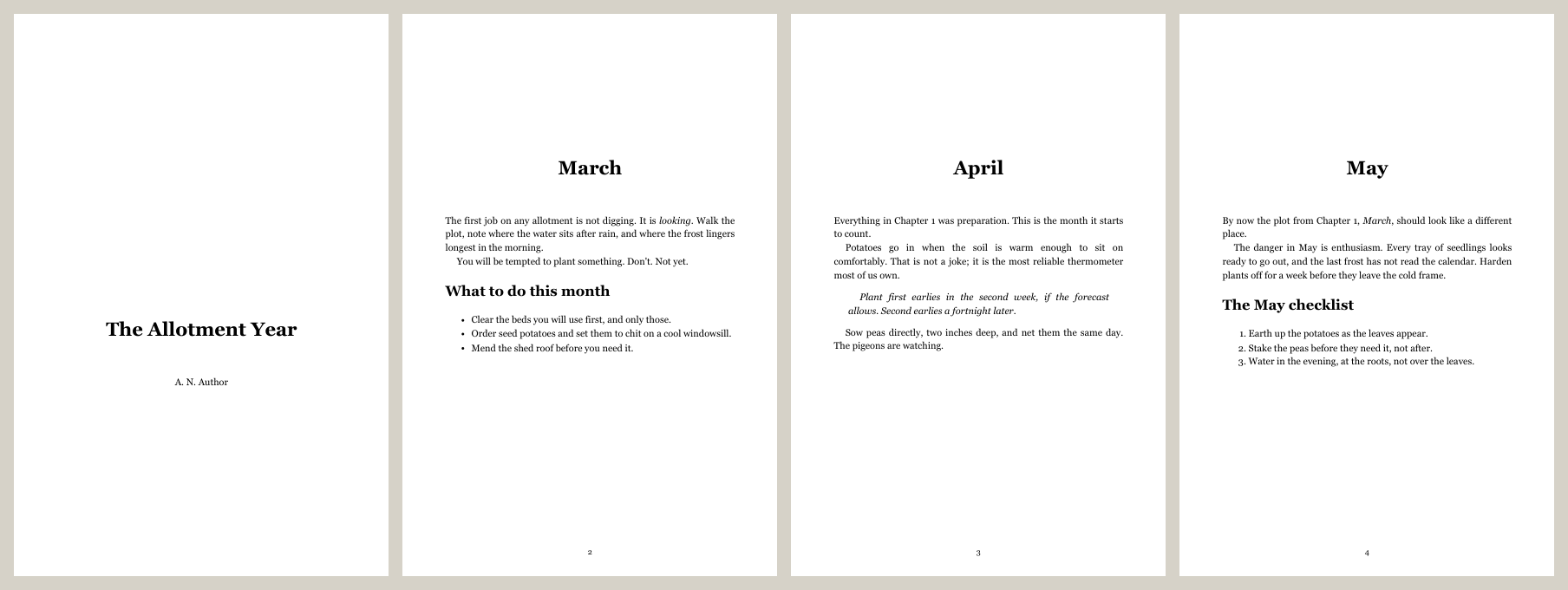
Some lines that make this work:
@page { size: 6in 9in }sets the trim size, and the browser uses it as the paper size. Your print service will tell you the exact size and margins it wants, so put those numbers here.@bottom-center { content: counter(page) }puts page numbers in the bottom margin, and the:firstrule leaves them off the title page. Older guides will tell you browsers can't number pages. Chrome has supported this for a while now, and it worked first time in the Chrome 154 I tested with.break-before: pageon the chapter heading starts every chapter on a new page.--virtual-time-budget=10000tells the browser to wait up to ten seconds for fonts and images to finish loading before it prints. Without it you can get a PDF in a fallback font, and nothing will warn you.
The honest trade-off. A browser gives you excellent, familiar layout tools. It does not give you the fine hyphenation and justification of a professional typesetting system. Look at the second paragraph of April above, where a short justified line has stretched its word spacing. For a non-fiction paperback that is a perfectly good trade, and it is the trade I made for both of mine. For a novel you care deeply about, look at fifty pages closely before you commit. If the spacing bothers you, change text-align: justify to left. Plenty of good books are set ragged-right.
6. Read it on a real device
A clean result from the validator means the file is correct. It does not mean it looks the way you want. So open it where your readers will:
- Kindle: Amazon's Send to Kindle accepts EPUB files directly, by email, through the app or on the web. It turns up on your Kindle a minute or two later.
- iPhone, iPad or Mac: open the file and it goes into Apple Books.
- Kobo: copy it onto the device over USB.
- On the computer: Thorium Reader and Calibre's viewer are both free.
Flick through the contents page, open a chapter, change the font size, and check the cover. That five-minute flick-through is part of the build, not an optional extra.
The four things that will catch you out
All four happened to me. Two happened this evening while I was building the sample book for this guide, and two happened on my real pipeline over the summer. Each one has a short symptom, cause and fix, and each is now handled by the scripts above.
1. The cover that the validator rejected
Symptom: my very first build tonight refused to publish:
NOT PUBLISHED - validation dirty. The draft is in build/ for inspection:
  ERROR OPF-096: Non-linear content must be reachable, but found no hyperlink to "OEBPS/cover.xhtml".
Cause: I had marked the cover page as "not part of the reading order", which a lot of older advice recommends. EPUB 3 then requires something else in the book to link to that page, and nothing did.
Fix: make the cover the first page of the reading order. It is one line, and it is already fixed in the script above. This is the validator gate doing its job on the first run: the faulty book stayed in build, nothing reached dist, and the error said exactly which file was at fault.
2. The validator that would have read yesterday's verdict
Symptom: none, and that is the danger. I found this one by reading my own script back.
Cause: the validator writes its verdict to a report file, and the script reads that file. If Java fails to start, no new report is written, and the script would have read the previous build's report instead. A broken book could have been passed using an old clean verdict.
Fix: delete the old report before every check. That is the line marked "never read last run's verdict by mistake". The PDF script follows the same rule and deletes the old PDF before printing, so an old file can never stand in for a new one. Wherever a program leaves a file for another program to pick up, clear it out first.
3. Eleven editions, eleven different books
Symptom: on my real pipeline, every rebuild of a book turned up on a reading device as a second copy instead of replacing the first. Reading position and bookmarks didn't carry over.
Cause: the builder created a new random identifier every time it ran. The function was documented as taking a stable identifier, but nothing ever passed one in, so the fallback ran every time. Across two books that came to eleven builds and eleven separate identities.
Fix: store the identifier once, against the book, and reuse it forever. For a book that had already shipped, I adopted the identifier already printed inside the shipped copy instead of creating a new one, so existing readers' copies are recognised as the same book. In this guide's script, that is what saving it into book.json does.
4. "As I said in Chapter 12"
Symptom: I added a chapter near the front of a book, and every later reference to a chapter by number quietly became wrong.
Cause: chapter numbers come from position, but a sentence in the prose can't know that. Each sentence still reads perfectly well, so proofreading sails past it.
Fix: let the build check every "Chapter N" before it starts. On my pipeline this check has been there from the beginning, and it is the part I would least like to give up. Here it is refusing a sample chapter I deliberately broke for this guide:
The Allotment Year: 3 chapters, 249 words
REFUSING TO BUILD - chapter references are wrong:
  ch03.xhtml: says Chapter 1 is 'April', it is 'March'
  ch03.xhtml: mentions Chapter 4, but there are only 3
It gives you a non-zero exit and no book, so you can't miss it.
The check that catches all four
The per-step "what you should see" only proves that the step you just did worked. These checks prove the book is right. I ran every one of them on the sample book tonight, and each takes seconds.
1. Is it really a clean EPUB?
java -jar ../tools/epubcheck-5.4.0/epubcheck.jar dist/the-allotment-year.epub
You want to see:
Validating using EPUB version 3.4 rules.
No errors or warnings detected.
Messages: 0 fatals / 0 errors / 0 warnings / 0 infos

EPUBCheck completed
The build script already does this check. Running it yourself lets you see the warnings too, which the script deliberately ignores.
2. Is mimetype first and uncompressed?
This check is worth having separately, because I tested the validator on it tonight. A book with mimetype in the wrong place gets a clear error (PKG-006: Mimetype file entry is missing or is not the first file in the archive). A book with mimetype in the right place but compressed got 0 errors from EPUBCheck 5.4.0. Reading apps are less forgiving than that, so check it yourself with one line:
python -c "import zipfile; i=zipfile.ZipFile('dist/the-allotment-year.epub').infolist()[0]; print(i.filename, 'stored' if i.compress_type==0 else 'COMPRESSED')"
You want mimetype stored.
3. Does the book keep its identity between editions?
Build twice and compare:
python build_book.py
python -c "import zipfile,re; print(re.search(r'urn:uuid:[0-9a-f-]+', zipfile.ZipFile('dist/the-allotment-year.epub').read('OEBPS/content.opf').decode()).group())"
Run both lines twice. The identifier must be the same both times. Mine printed urn:uuid:7c350f76-f0b7-48a8-8a38-31b493a06f83 on both builds. Also check that the third group of the identifier starts with a 4, which marks it as a random (version 4) UUID that leaks nothing about your machine.
4. Do the gates actually stop anything?
A safety check you have never seen fire is one you are trusting on faith. Make each one fire once:
- Add the sentence
Compare Chapter 99.to any chapter and build. You wantREFUSING TO BUILDand no new file indist. Then take the sentence out. - Rename the
tools/epubcheck-5.4.0folder and build. You wantNOT PUBLISHED - validation unknown, notCLEAN. Then rename it back.
Both did exactly that on Ezekiel tonight. If either of yours prints CLEAN, then that check isn't protecting you, and it's much better to find that out now than after you publish.
5. Is the PDF the size your printer wants?
The last line of make_print.py prints the page count and the page size. The size must match your printer's trim size exactly. Many print services also want the page count to be a multiple of 2 or 4, and will add blank pages at the end if it isn't. Then open the PDF and look at the first page of every chapter.
What it costs
Money: nothing. Python, Python-Markdown, pypdf, Java, EPUBCheck and Chrome are all free. Printing and distribution cost what your chosen service charges, and that is outside this guide.
Time, measured on 1 October 2026: 3.1 seconds to build and validate the ebook, 1.0 second to make the PDF. The sample book is tiny, but the same approach handles a full book. On my pipeline, rebuilding every edition of both books, 39 chapters and about 72,000 words of chapter text, took one afternoon, and nearly all of that was me checking the results rather than the machine doing the work.
Disk: 33MB for the EPUBCheck download, and the sample ebook is 41KB, most of which is the cover.
When it grows up
Here is what the full-size version looks like, in case it is useful when your own folder starts to feel small.
Mine keeps the book in a database rather than a folder, and the design underneath is the same as this guide. Each section of the book is a row with a position: front matter, chapter, part divider or back matter. Each edit is a new version of that section, which is never overwritten, so I can always see what changed and go back to an earlier version. Part dividers are sections in their own right, so the whole shape of the book is one ordered list. As in this guide, nothing stores "this is Chapter 12". The numbers are worked out at build time from the order, and the reference check is what lets that be safe.
You don't need any of that to start. A folder of numbered Markdown files and version control give you most of it. If you already use git, commit the chapters and book.json, and you have the version history.
Getting an assistant to do this for you
Both scripts in this guide were written by an AI assistant this evening, from an empty folder, in about fifteen minutes. That includes both of the mistakes in the section above, one caught by the validator and one caught on a read-back. I used Claude, but nothing here depends on which assistant you use.
You can do the same thing, and you will probably get a version that suits your book better than mine. These are the three things that make the difference.
Tell it the format facts up front. An assistant will happily write you an EPUB builder, and most of it will be right. What it can't know is which details matter to you. A brief like this gets you most of the way:
Write me a Python script that builds an EPUB 3 from a folder of Markdown
chapters (one # heading each, filename order is reading order) and a
book.json with title, author and language. Requirements:
- mimetype first in the zip and stored uncompressed
- a version-4 UUID identifier, created once and saved back into book.json,
  never regenerated
- before building, check every "Chapter N" reference in the prose is in range,
  and refuse to build if not
- build into build/, validate with EPUBCheck's --json output, and copy to dist/
  only if it is clean; if the validator cannot run, treat that as a failure
Ask what it does when something is missing. That is the general form of mistakes 2 and 3 above. Both were a sensible-looking fallback that quietly did the wrong thing when an input wasn't there. "What happens if the identifier isn't in book.json?" and "What happens if Java isn't installed?" are cheap questions, and an assistant answers them well when asked.
Then make it prove the safety checks. Ask it to break a chapter reference on purpose and show you the refusal, and to hide the validator and show you the "unknown". If it can't make a gate fire, the gate isn't finished yet.
Worth it?
Yes, and I would say so even if you only ever publish one book.
What you get is not really the four seconds. It is that your book stops being a file you are afraid to touch. Your manuscript is plain text that you own and can read in anything, and the ebook and the paperback are things you rebuild whenever you like, without opening a single piece of publishing software. You can fix a typo on the day a reader emails you about it, and the corrected edition replaces the old one on their device with their place kept. The book checks its own cross-references and its own validity before it lets you have it, so the mistakes that usually reach readers get caught on your desk.
All of that comes from two scripts, the official validator and the browser you already had. Write the book. This part is the easy bit now.